

Email Security : Advanced Protection for Your Inbox
PRODUCTS GateScanner Mail Gateway – Securing Email
GateScanner Mail Protection – Secure your Email with CDR
Business email is the primary vulnerability of most organizational networks. Innocent-looking messages harboring malicious content are the most common method used today to establish an initial foothold for a zero-day, ransomware or APT attack.
GateScanner Mail Protection offers enhanced defense vs. known threats as well as advanced zero-day defense vs. unknown threats.
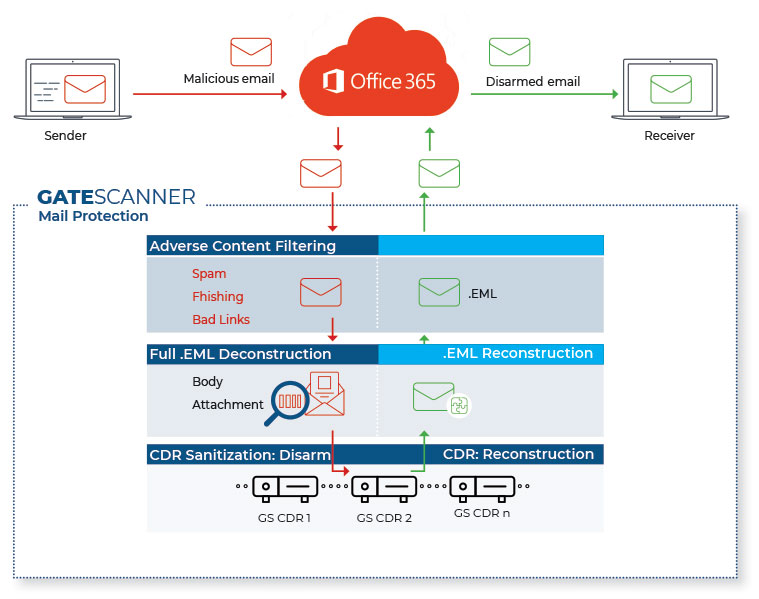
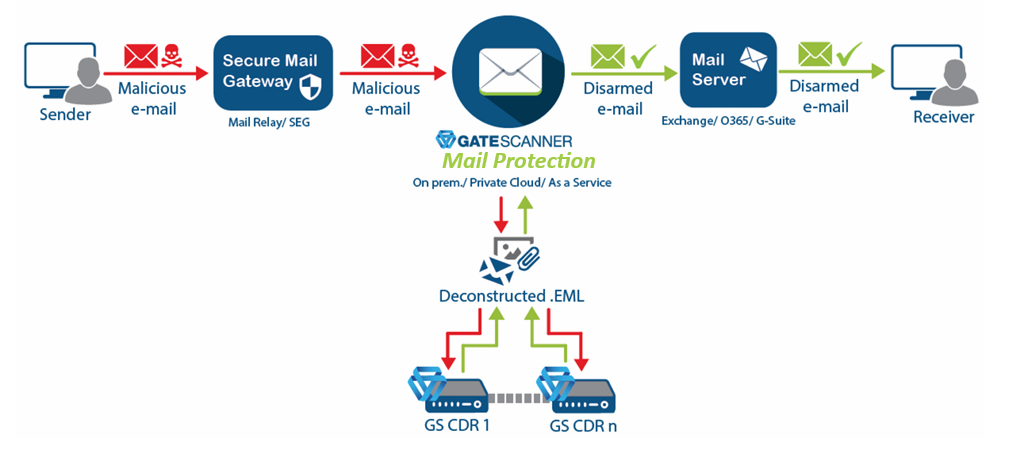
GateScanner Mail Protection can be implemented as a full SEG or as a SMTP mail relay, on-premises, on private cloud, or as an Office 365 Outlook integration.
-
Content Disarm and Reconstruction (CDR)
Applied to fully deconstructed.EMLfiles -
Multi-AV scans
Including NextGen AI and proprietary static code threat analysis -
Multiple file-type verification
Ensures declared file types match actual content -
Password-protected attachment handling
Secure decryption and scanning of encrypted files -
Office 365 & Microsoft Exchange integration
Seamless deployment into existing mail infrastructures
-
URL filtering
Applied to both message body and attachments -
Real-time IP reputation intelligence
Dynamic sender risk evaluation -
AI-Powered Anti-Phishing
Identity consistency, contextual link analysis, and behavioral phishing indicators -
Anti-spoofing
Enforcement of DKIM, DMARC, and SPF controls -
Anti-spam
Standard and advanced spam filtering
Additional features
- Full email security dashboard, history and reports
- Integrations with secure vaults, sandbox tools, and more
- Multiple tenants and domains supported
- Proprietary email reconstruction according to RFC 2822
- Disables advanced evasive malware, including file spoofing, payload insertion, steganography, and Base64 encoding
- Privacy protection with tracking pixel removal
- Centralized daily AV updates
- Centralized auditing
- Rule-based DLP on outbound mail
- Profile-based scanning with Active Directory (AD) integration
GateScanner Secure Mail Gateway Administration Walkthrough – Part 1
